Zety alternatives
Zety alternatives without a subscription: the honest, no-renewal options
Zety hides formatted downloads behind a plan that bills every four weeks. Here are the free, one-time and privacy-first alternatives, with real prices and where your data actually goes.
Zety is one of the most searched resume builders online, and one of the most searched things next to its name is how to cancel it. That pairing tells you most of what you need to know. The builder itself is capable, but the pricing is built to catch you: you fill in a CV for free, then hit a wall at the one moment that matters, which is downloading a properly formatted file. Getting past that wall means starting a plan that renews on its own.
If you want a CV without a recurring charge sitting on your card, this is the honest list of Zety alternatives without a subscription. Every price here was checked in August 2026, in the currency each tool uses. Resume builders change prices often and run region-specific trials, so confirm the figure at checkout before you buy.
What "no subscription" actually means
The phrase gets used loosely, and three different models hide behind it. The difference decides what you actually pay.
Free forever
Tools like FlowCV and Reactive Resume let you build and download a CV without paying anything. The usual trade-off is a cap on how many documents you can keep, or that your file sits on someone else's server.
One-time payment
You pay once and the software is yours. No renewal, no per-download fee. This is the model desktop apps use, and it is the closest thing to buying a tool outright rather than renting access to your own CV.
Priced per period, but no auto-renew
Some builders sell a month or a year of access that simply expires instead of renewing. You still pay again if you need it later, but no charge appears on its own.
We break the money side down in full in one-time payment vs subscription resume builders. Here the focus is anything that keeps you off a rolling monthly bill.
What Zety actually costs in 2026
Here is the part that catches people. Zety's free plan lets you build a CV and use every template, but it only exports plain text, which strips the formatting and is not something you would send to an employer. To download a real PDF or Word file you need a paid plan. Independent pricing breakdowns in 2026 put that plan at roughly 1.95 US dollars for a 14-day trial, then about 25.95 dollars every four weeks if you do not cancel (PitchMeAI).
Two details do the real damage. First, "every four weeks" is not "monthly". A year holds thirteen four-week periods, not twelve, so the recurring plan bills you thirteen times, which works out to around 337 dollars a year rather than the 26 your brain files it under. Zety also sells an annual plan near 71 dollars, cheaper on paper, but it renews on its own too. Second, the trial converts automatically. That combination is why "how to cancel Zety" is such a common search in the first place.
This is the pattern the whole subscription model runs on. A C+R Research survey of 1,000 consumers found people guessed they spent 86 dollars a month on subscriptions, while their itemised spending averaged 219, more than 2.5 times higher (C+R Research). A CV you need for a few weeks should not quietly join that pile.
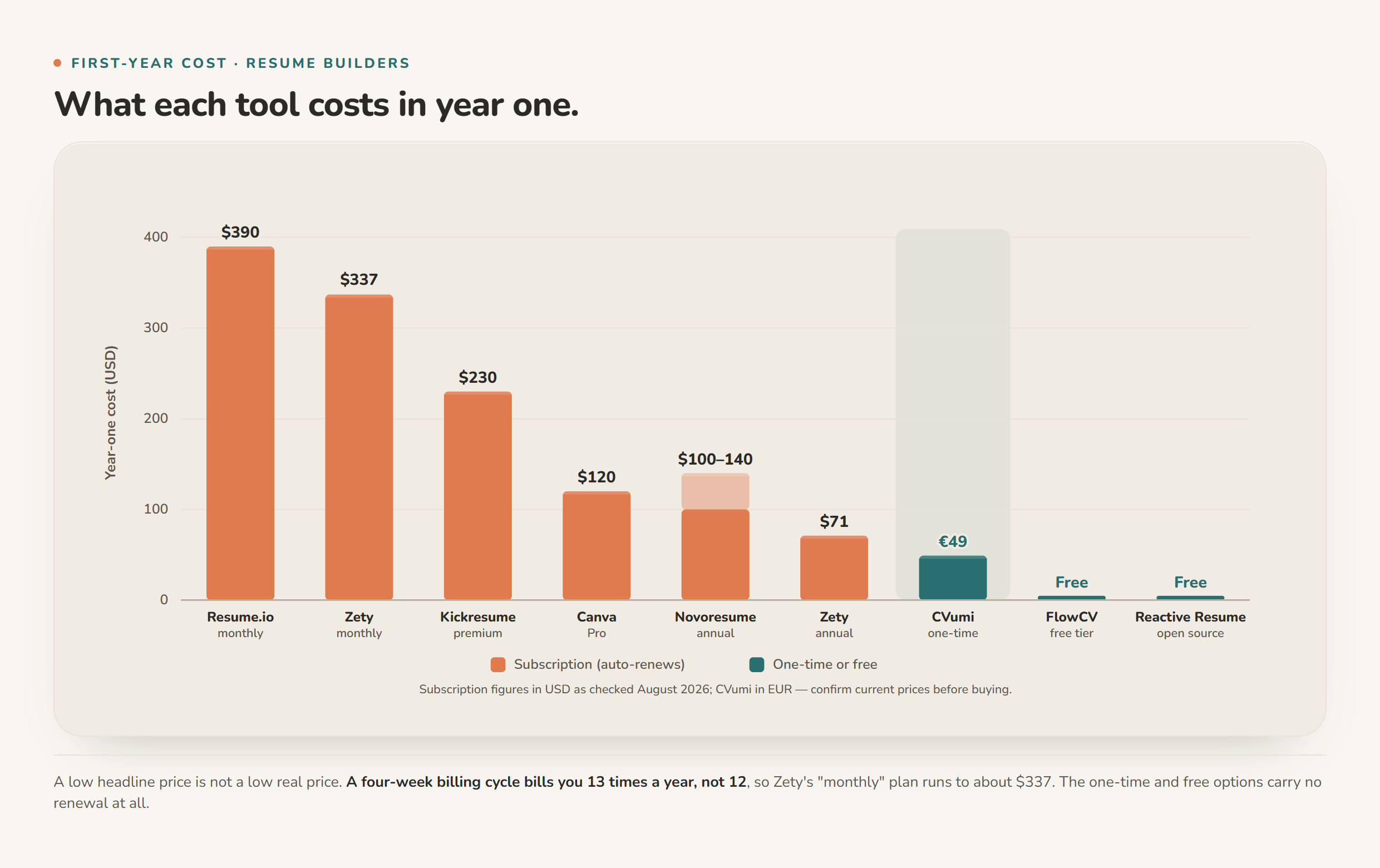
Zety alternatives without a subscription, compared
The table is priced in each tool's own currency and checked in August 2026. Subscription builders run regional trials and change prices often, so read these as the shape of the deal, not a permanent quote, and confirm before you pay.
| Tool | Pricing model | Real cost (Aug 2026) | Auto-renews? | Where your CV lives |
|---|---|---|---|---|
| Zety | Subscription | ~25.95 USD every 4 weeks (~337/yr), or ~71 USD/yr | Yes | Their servers |
| Resume.io | Subscription | ~29.95 USD every 4 weeks, or ~80 USD/yr | Yes | Their servers |
| Kickresume | Subscription | ~19 to 24 USD/month | Yes | Their servers |
| Novoresume | Free tier + paid periods | Free (1 CV), or ~100 to 140 USD/yr | Often not, check at checkout | Their servers |
| Canva | Free tier + Pro subscription | Free, or ~120 USD/yr for Pro | Yes (Pro) | Their servers |
| FlowCV | Free + paid Pro | Free (1 CV) | No (free tier) | Their servers |
| Reactive Resume | Free, open source | Free | No | Their servers or your own |
| CVumi | One-time payment | 69 EUR once (34 EUR student) | No | Your own machine |
Two things stand out. "Free" and "private" are not the same, which the last column makes clear: most tools here, paid or free, keep your CV on their servers. And a low headline price is not a low real price once a four-week billing cycle and an automatic renewal are in play.
A closer look at each option
FlowCV: the best free web builder
FlowCV gives you one CV, unlimited watermark-free PDF downloads, and no card up front. For a single application or a quick refresh, free is hard to argue with. The limits are the one-document cap on the free tier and the fact that your file lives on FlowCV's servers.
Reactive Resume: free and genuinely yours to host
Reactive Resume is open source and free with no download limits. Because the code is public, you can run it on your own machine or a server you control, which is the most private setup on this list if you are comfortable with a little technical work. The hosted version is still free, but it keeps your data in the cloud.
Novoresume: a usable free tier, careful with the paid plans
Novoresume's free tier gives you one PDF CV with a reasonable set of templates. Its paid plans are sold by the month, quarter or year, with the annual figure cited between roughly 100 and 140 dollars depending on the source and the current promotion. It is often listed as not auto-renewing the way Zety does, which is a genuine point in its favour, but read the renewal terms at checkout rather than taking that on trust.
Kickresume: capable, but still a subscription
Kickresume has a free tier and a premium plan that runs around 19 to 24 US dollars a month depending on plan length. It is a subscription, so the auto-renew question applies exactly as it does with Zety. If Kickresume is the tool you are actually weighing up, we wrote a focused guide to Kickresume alternatives without a subscription.
Canva: fine if you already pay for it
If you already keep Canva Pro (about 120 dollars a year) for other design work, its CV templates are perfectly usable. As a CV-only purchase it is poor value, and the templates are design-led rather than built for applicant tracking systems, so check that the layout parses cleanly before you rely on it.
CVumi: one payment, and it runs on your machine
CVumi takes the desktop route. It is a one-time payment: 69 EUR for a standard licence with three device activations, or 34 EUR with a student email. No subscription, no auto-renewal, and no per-application credit. It runs locally on Windows and macOS, and your CV, your master profile and your past applications stay in a folder you choose on your own computer. Nothing leaves the device until you send it.
The AI features run on your own API key, so you pay Anthropic directly for what you use rather than a flat monthly fee to a CV company. That is a different model worth understanding: one setup step at the start, and a usage cost that stays small across a normal job search.
For the one price you get an honest fit analysis that compares a job posting against your real history and flags genuine gaps instead of inventing achievements, a chat to reword any single section, format and mood presets (modern, Swiss, grid, the classic German Lebenslauf, a clean one-pager), balance controls that weight recent work against education and skills, output in English, German, French, Spanish, Polish, Italian and Portuguese, interview questions generated from the actual posting, and a one-click handoff that opens your own email client with the CV and cover letter attached, ready for you to review and send.
Privacy: the difference between free and private
Free and private are separate questions. Most builders here, whatever they cost, store your CV on their servers, which means your employment history, your contact details and sometimes your salary expectations sit in a database you do not control.
If that matters to you, two setups stand out: Reactive Resume run locally, and a desktop app such as CVumi where the documents never leave your machine unless you send them. We compare the whole field on this exact point in the best privacy-friendly AI CV builders in 2026.
Which one should you pick?
- Need it once and want it free: FlowCV.
- Want free and are happy to self-host: Reactive Resume.
- Already pay for Canva: use its templates, but check the ATS parsing.
- Want to own the tool, keep your data on your own machine, and get honest AI help with no subscription: CVumi.
None of these guarantees an interview. If your applications are not landing whatever the tool, the problem is usually the CV itself, which we cover in why your CV keeps getting rejected.
Build your CV once, then keep it
A job search is stressful enough without a CV subscription quietly billing you every four weeks after you have already landed the role. If you would rather pay once, keep your documents on your own machine, and get AI help that flags real gaps instead of padding your history, that is what CVumi is built for. Pay 69 EUR one time, or 34 EUR with a student email, install it on Windows or macOS, and your CV stays yours, with no meter running and nothing to cancel. Download CVumi and build your next application on your own terms.