Teal CV tool alternative
Teal vs local, private CV tools: an honest comparison
Teal is a strong job-search organiser, but your resume lives in its cloud and the AI sits behind a subscription. Here is an honest comparison with local, private CV tools, with real prices, the data question, and how to choose.
People rarely go looking for a Teal alternative because Teal is bad. Usually it is the opposite. They tried Teal, liked how it kept every application in one place, and then hit one of two walls. The AI that writes and matches resume content sits behind Teal+, a subscription billed by the week or the month. Or they stopped to think about where their resume actually lives, which is on Teal's servers, tied to an account, sitting next to their name, address, phone number and full work history.
If either of those is why you are here, this is a comparison, not a takedown. Teal does some things well that a local tool does not try to do at all. A local, private CV tool does one thing Teal cannot: it keeps your career documents on your own machine and charges you once. Which one is right depends on what you are optimising for, so here is the full picture, with real prices.
What Teal is, and what it is good at
Credit where it is due first. Teal (tealhq.com) is a web app with a Chrome extension. Save a job posting from your browser and Teal pulls it into a tracker, where you log where each application stands and rank roles by how much you actually want them. The free plan is generous: unlimited resumes, unlimited saved jobs, and the tracker itself, at no cost. That last part matters, and any honest comparison has to say it plainly. If all you need is somewhere to organise a busy search, Teal's free tier is hard to beat.
The paid tier, Teal+, is where the AI lives. Keyword matching against a job description, AI-generated bullet points, and unlimited AI edits are what you get by subscribing. As published in mid-2026, Teal+ runs about 9 US dollars a week, 29 a month, or 79 every three months, with a yearly option reported around 179 in some places. Check Teal's pricing page for the current figure, because these change.
So Teal is really two products in one: a free job tracker that is very good, and a paid AI resume assistant. People start searching for a Teal CV tool alternative when they want the second part without the subscription, or when they would rather their resume not be in the cloud at all.
Why people look for a Teal alternative
Three reasons come up most often.
First, the AI is a subscription. Weekly billing is the one to watch. Nine dollars a week sounds small, but left running it works out to about 468 dollars a year, more than the monthly plan costs over the same twelve months. A subscription is also something you have to remember to cancel. The US Federal Trade Commission's "click to cancel" rule exists precisely because stopping a recurring charge is often made harder than starting one (FTC). None of that is specific to Teal. It is just how subscriptions work.
Second, your resume lives on their servers. Teal is a cloud product, so using it means creating an account and storing your CV, your saved jobs and your history on Teal's infrastructure. It collects your name, email, mailing address and phone number at sign-up, plus card details if you upgrade, and states that it does not share your data with third parties without permission. That is a reasonable policy. It is still a copy of your most sensitive personal document sitting on a server you do not control.
Third, Teal organises but does not fully assemble. It tracks jobs and helps with the resume. What it does not do, in one pass, is write you a tailored CV, a matching cover letter, and the covering email to send them with. If your actual bottleneck is producing complete, tailored applications quickly rather than tracking them, that gap is the reason to look elsewhere.
Teal vs a local, private CV tool: side by side
The clearest way to compare is feature by feature. "Local tool" here means a desktop app that keeps your files on your own computer. I am using CVumi as the worked example because it is the one we make and know in detail. Prices are as published in mid-2026, in their original currencies.
| Teal | Local, private tool (CVumi) | |
|---|---|---|
| What it is | Web app plus Chrome extension | Desktop app for Windows and macOS |
| Where your documents live | Teal's cloud servers, tied to an account | A folder you choose on your own computer |
| Account required | Yes | No account holds your documents |
| Pricing model | Free tier, plus Teal+ subscription for the AI | One-time payment |
| Real price (mid-2026) | Free, or Teal+ about 9 USD/week, 29/month, 79/quarter | 69 EUR once, or 34 EUR with a student email; three device activations |
| How the AI is paid for | Bundled into Teal+ | Your own AI provider key, billed by usage, usually a few cents per document |
| Job application tracker | Yes, and it is a strength | No built-in tracker |
| Tailored CV, cover letter and email together | Resume help, but not all three in one step | Yes, generated together for each job |
| Fit analysis | Keyword matching | Shows real matches and real gaps, from your actual experience |
| Uses your CV without uploading it | No, it is cloud-based | Yes, files stay on your machine; AI generation still needs a connection |
Two notes on that table. Teal's tracker is a real advantage, and a local tailoring tool does not replace it. And "local" is not the same as "offline". A local tool keeps your files on your device, but generating with AI still sends that one request to a provider over the internet. The difference is that nothing is parked on the tool maker's server in between. If that distinction matters to you, we go deeper in local and offline AI resume tools compared.
What it costs over three years
A job search is rarely a single month, and many people come back to the same tool for the next move. Three years is a fair horizon. Teal's free tier stays free, so if you never need the AI, your cost is zero, and that is the floor. The moment you want the AI, the subscription starts to climb.
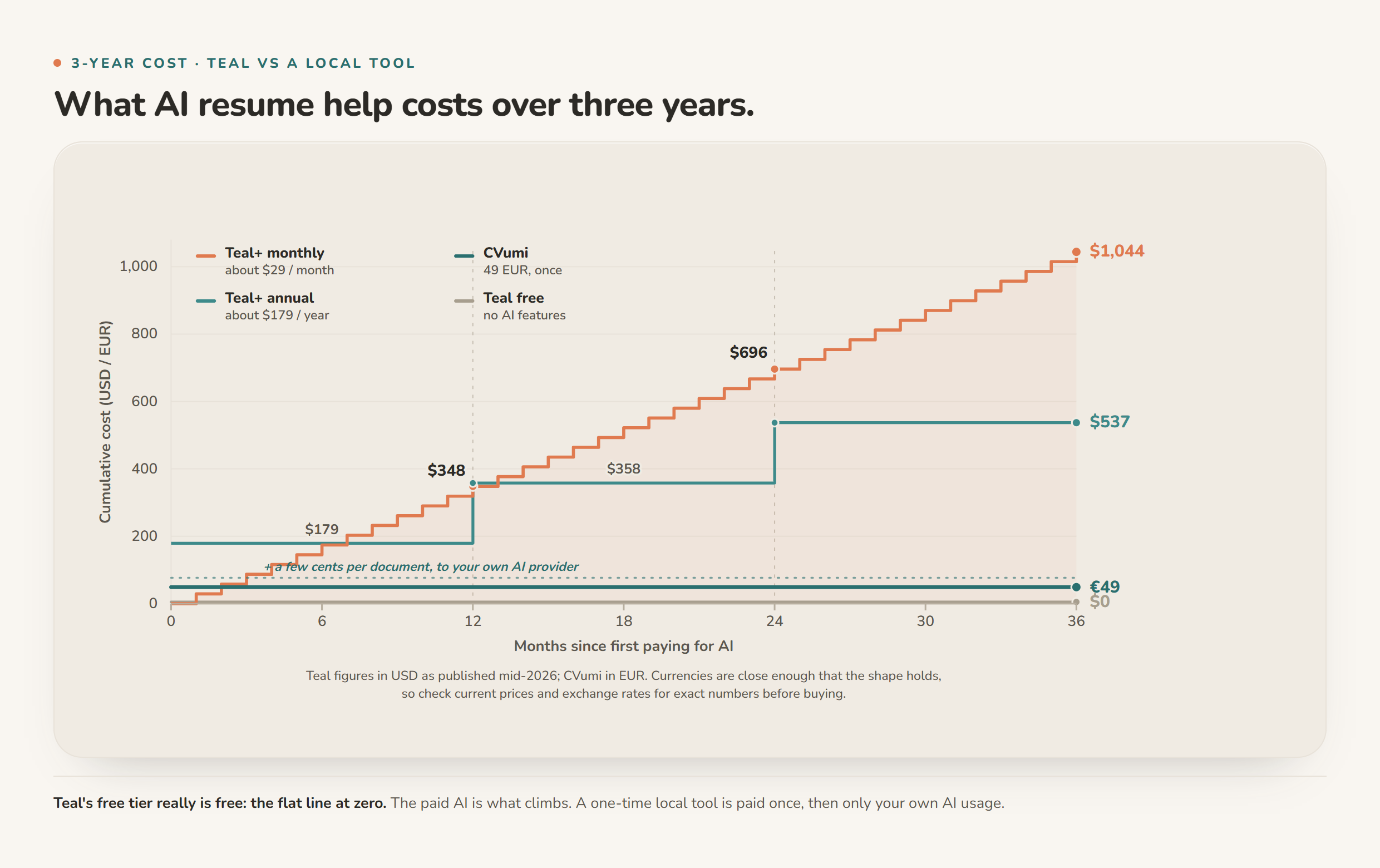
The shape is the point. Teal free is a flat line at zero, with no AI. Teal+ on the monthly plan climbs past a thousand dollars across three years. A one-time local tool is a flat line just above zero, at the price you paid once, plus the few cents per document you pay your own AI provider directly. If you want the full breakdown of pricing models, and where the hidden costs sit, we wrote one-time payment vs subscription resume builders. And if paying the AI provider yourself is new to you, bring-your-own-API-key resume tools, explained covers how that works and what it actually costs.
The data question: where your CV actually sits
This part has nothing to do with money. Your CV is one of the most revealing documents you own. Full name, home address, phone number, every employer, every date, and sometimes a photo or your nationality. With any cloud resume builder, Teal included, that document sits on the provider's servers under an account.
You do have rights over it. In the EU, the right to erasure under GDPR Article 17 lets you ask a company to delete your personal data. It is worth using, and it has limits worth knowing. It reaches the copies the company controls, but backups and data already shared can linger, and the law lists cases where the right does not apply. Deleting a file after the fact is always weaker than never uploading it in the first place. The most private copy of your CV is the one that never left your computer. That is the whole case for a local tool, and we set out the practical method in how to keep your career documents fully private.
What you give up by going local
An honest comparison runs both ways, so here is what a local one-time tool costs you that Teal does not.
You lose the built-in tracker. Teal's job tracker is genuinely useful, and a tailoring-focused desktop app does not give you one. If keeping thirty live applications straight is your main problem, that is a real reason to stay with Teal, or to pair a tracker with whatever writes your applications.
You manage your own files. They sit in a folder on your machine, which means your backups are your responsibility rather than something synced for you.
You bring your own AI key. Instead of a bundled subscription, you create a key with an AI provider and pay them directly for what you use. It usually costs less over time, but it is one extra setup step at the start.
And it is desktop software. Windows and macOS, not a browser tab you can open on any machine you happen to be sitting at.
None of these are dealbreakers for someone whose priority is privacy and paying once. All of them are real. Pick the tradeoff you actually want, not the one a pricing page nudges you toward.
How to choose
Choose Teal, most likely the free tier, if your main need is organising a large search and you are comfortable with your resume living in the cloud. Add Teal+ if you want its AI and the subscription maths works for your timeline.
Choose a local, one-time tool if your priority is keeping your CV on your own machine, paying once, and turning a job posting into a tailored CV, cover letter and email together. If you want a wider field than just one product, we compared several in the best privacy-friendly AI CV builders in 2026.
One thing no tool fixes for you: if your applications are not landing, the problem is usually the CV itself, not the software around it. That is a separate and fixable problem, and worth sorting out before you pay for any tool.
How CVumi fits
CVumi is the local option in the table above, so here is what it actually does, plainly. It is a desktop app for Windows and macOS with a one-time price: 69 EUR for a standard licence with three device activations, or 34 EUR with a student email. No subscription, no per-application credits.
Your CV, your master profile and your past applications stay in a folder you choose on your own computer. CVumi runs no server that stores your documents. When an AI step runs, the request goes from your machine straight to the AI provider under your own key, so you pay the provider directly, usually a few cents per document, and nothing is parked on a CVumi server in between.
From one job posting it writes a tailored CV, a matching cover letter and the covering email together, and its fit analysis shows where you genuinely match the role and where the honest gaps are, working only from your real experience. When the application is ready, one click opens your normal email client with the files attached, so you review and send it yourself.
The short version
Teal is a strong job tracker with a capable AI assistant behind a subscription, and your data lives in its cloud. A local, one-time tool keeps your CV on your machine, charges you once, and focuses on turning a job posting into a complete, tailored application. Teal is the better organiser. A local tool is the better fit when privacy and a single payment are what you care about. Neither one guarantees an interview. They are both just tools, and the CV underneath still has to be good.
If you would rather keep your career documents on your own computer and pay one time, download CVumi. One payment, your files stay local, and you hold the key.