offline AI resume builder
Local and offline AI resume tools compared
Offline and local are not the same thing. What "offline AI" really means for resume tools, an honest comparison of the options, and a quick test to check any claim.
Search for an offline AI resume builder and you are really asking for two things that pull in opposite directions. Offline means nothing leaves your computer. AI, for almost every tool on the market, means a request sent to a model running on someone else's server. Both can be true. They are rarely true at the same time.
That gap is worth understanding before you pick a tool, because the words get used loosely. A builder can call itself local and still send your CV out the moment you press generate. Another can run with the network switched off but write none of the words for you. This article sorts the two ideas apart, compares the real options in 2026, and gives you a one-minute test to check any tool's claim for yourself.
Local and offline are not the same thing
Two words do most of the confusing work here, so here are plain definitions.
Local means the software and your files sit on your own device. There is no vendor database holding a copy of your CV. You open the app, your documents are in a folder you chose, and the company behind the tool never sees them.
Offline means the tool works with the network switched off. Nothing leaves the machine, not once. You could unplug the router, sit on a train with no signal, and still finish the job.
The two overlap, but they are not the same line. A local app can still make network calls. The most common one is the AI step: your file stays on disk, but when you ask for a tailored draft, the text of your CV travels to a model provider and back. That app is local. It is not offline. For a truly offline tool, the model itself has to run on your hardware, or there is no AI in it at all.
Which one you need depends on what you are guarding against. If the worry is a vendor keeping a permanent copy of your career history, local-first already closes that door. If the worry is anything at all leaving the laptop, for a role under NDA, a security-sensitive employer, or your own line in the sand, then you need genuinely offline, and that is a shorter list.
Can an AI resume builder actually run offline?
Yes, on one condition: the model has to run on your own machine.
That is more achievable than it was a year ago. Tools like Ollama let you download an open model such as Llama, Mistral or Gemma and run it entirely on your computer. Ollama's own site frames the option as being able to "run entirely offline", and states plainly that "your data is never trained on". After the first download, the model sits on your disk and answers without a connection. Pair that with a resume tool that can point at a local model, and you have an AI resume builder that never phones home.
There is a real cost to name. A local model leans on your hardware, so it wants a fair amount of memory and runs faster with a decent GPU. Setup takes more than opening a website. And the honest part most pages skip: an open model you run at home is usually a step behind the best hosted models on the quality of the writing. For a lot of jobs that is fine. For a role where the wording has to be sharp, you will feel the difference.
There is a second, simpler kind of offline that has no AI at all. A plain text editor, a LaTeX template, or a browser-local builder like OpenResume will lay out a clean CV without a single network request. You write the words yourself. That is offline in the strictest sense. It just is not the thing most people mean when they type AI into the search box.
The four ways an AI resume tool handles your data
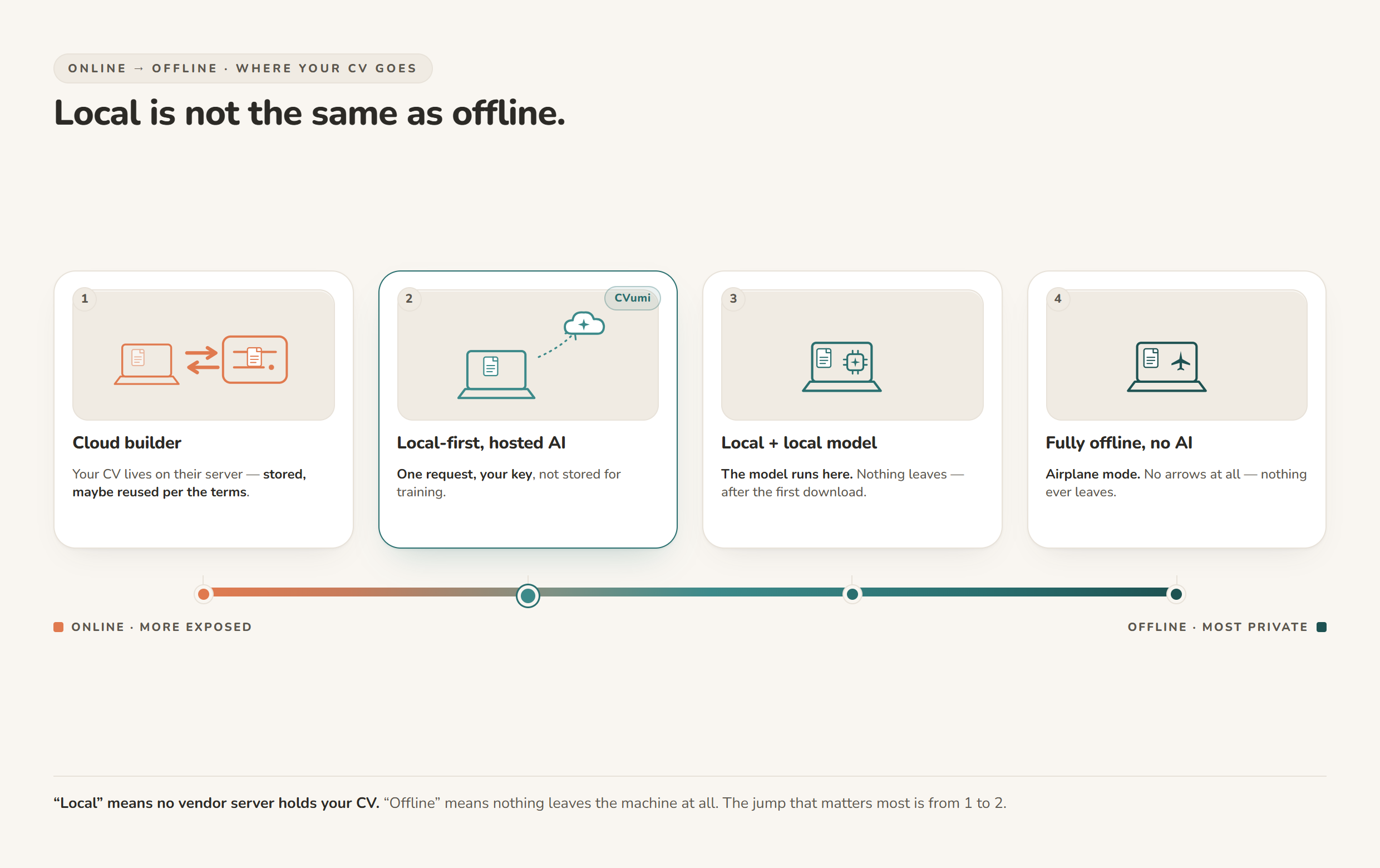
Strip away the branding and almost every option falls into one of four modes, running from most exposed to most private.
- Cloud builder. You upload, edit and store everything on the provider's servers, and the AI runs there too. Convenient, syncs everywhere, and the least private, because a copy of your CV lives on a machine you do not control.
- Local-first with a hosted model. Your files stay in a folder on your device. When an AI step runs, one request goes out to a model provider under your own key, then the result comes back. No builder server keeps your file. This is where CVumi and a self-hosted Reactive Resume with a hosted key sit.
- Local with a local model. Files on your device, and the model runs on your device too, through something like Ollama. Nothing leaves the machine, even for the AI. Reactive Resume can be pointed at a local Ollama endpoint, which makes this route real without writing any code.
- Fully offline, no AI. An editor or a browser-local builder. Zero network, zero AI help with the words.
The jump that matters most is between 1 and 2. It is the difference between your CV living on a stranger's server and living on your disk. The jump from 2 to 3 is smaller in privacy terms and larger in effort: you trade one request under your own key for the work of running a model yourself.
| Setup | Where the AI runs | Works with network off | Does your CV leave the device | Setup effort | Cost |
|---|---|---|---|---|---|
| Typical cloud AI builder | The provider's servers | No | Yes, and a copy is stored | Low | Monthly subscription |
| CVumi (local desktop, your own key) | Anthropic, via your key | No, the AI step needs a connection | Only the one AI request, not stored for training | Low | One-time, 69 EUR (34 EUR student) |
| Reactive Resume + hosted key (self-hosted) | Your chosen provider, via your key | No, the AI step needs a connection | Only the AI request | Medium, you host it | Free, open source |
| Reactive Resume + local Ollama model | On your own machine | Yes, after the model is downloaded | No | High, host it and run a model | Free, open source |
| Ollama plus a text editor | On your own machine | Yes, after the model is downloaded | No | High, do it yourself | Free |
| OpenResume or a plain editor | No AI involved | Yes | No | Low | Free |
The honest tradeoffs of going fully offline
Fully offline is the most private setup, and it asks the most in return. It is worth being clear about the bill.
Hardware. A capable local model wants memory and, ideally, a GPU. On a modest laptop it will still run, just slowly, and you may be limited to smaller models.
Quality. The open models you can run at home have closed a lot of ground, but the strongest hosted models are still ahead on nuanced writing. If your CV needs to read beautifully, that gap is real.
Effort. Running Ollama and wiring a tool to it is a weekend-project level of setup, not a one-click install. Once it is running it is smooth. The first hour is on you.
No sync. Everything stays on one machine unless you copy it yourself. That is the point, and also a mild inconvenience.
For most job seekers, local-first is the sweet spot. You tailor a handful of applications a week, you want the AI to actually help with the words, and your real concern is that no company keeps your history on file. Fully offline earns its keep when the stakes are higher: a confidential search, an employer with strict data rules, or work where nothing is allowed to leave the device. Match the setup to the risk, not to the strongest word in the marketing.
How to test whether a tool is really offline
You do not have to take any tool's word for it. Four quick checks settle it in about a minute.
- The airplane-mode test. Disconnect the network, then try the AI feature. If it works, the model is on your machine. If it errors or hangs, the tool was calling out, and it is not offline.
- Watch the traffic. Open your operating system's activity or resource monitor, or the Network tab in your browser's developer tools, and press generate. A request to a model host the instant you click is your answer.
- Follow the key. If the tool asks for an API key to a hosted provider, your CV text leaves during the AI step by design. That can still be private, as with a provider that does not train on your data, but it is local-first, not offline.
- Find the file. Check where your CV is saved. A folder you picked is local. An online account dashboard is not.
Behind these checks is a principle worth keeping. The cleanest way to protect a piece of data is not to encrypt it or to trust a deletion promise. It is to not send it in the first place. European data-protection law leans the same way through data minimisation, the rule that you collect and process no more personal data than you actually need (GDPR Article 5). Offline tools take that idea to its limit: they send nothing, so there is nothing to leak, retain or reuse.
Where CVumi fits
CVumi is a local-first desktop app for Windows and macOS, and it is honest about which line it sits on. Your CV, your master profile and your past applications live in a folder you choose on your own computer. There is no CVumi server holding your documents, and the company never sees them.
When an AI step runs, the request goes straight from your machine to your chosen AI provider under your own API key, not through a CVumi database that keeps a copy. On the training question that worries people, Anthropic states it plainly for its API: "By default, we will not use your inputs or outputs from our commercial products (e.g. Claude for Work, Anthropic API, Claude Gov, etc.) to train our models" (Anthropic, model training policy). So the chain is short: file on your disk, one request under your key, nothing folded into a training set afterwards.
Here is the honest placement. CVumi is local, not offline. The AI steps need a connection, the same as any tool built on a hosted model. If your bar is that nothing may ever leave the machine, the Ollama route above is the better match. If your bar is that no vendor server holds your CV and you still want the AI to do the heavy lifting, that is exactly what CVumi is built for.
What you get for that: paste or find a job, and CVumi writes a tailored CV, a matching cover letter and a covering email in one pass. Its fit analysis shows where you genuinely match the role and where the gaps are, drawn only from your real experience, so it does not invent achievements to fill a blank.
You can highlight any section and ask it to refine that part alone, and you can chat with your CV to sharpen the wording without touching the rest. It handles several formats, including the German Lebenslauf, and produces applications in seven languages: English, German, French, Spanish, Polish, Italian and Portuguese.
When the application is ready, one click opens your normal email client with the CV and cover letter attached, so you check it and send it yourself. Nothing goes out on your behalf.
On price, CVumi is a one-time payment: 69 EUR for the standard licence with three device activations, or 34 EUR with a student email. No subscription and no per-application credits. If you are weighing that against a monthly tool, see one-time payment vs subscription resume builders.
The short version
There is no single best answer here, only the one that matches how private your search needs to be.
- You want AI to do the writing, and your real concern is that no company keeps a copy of your CV: choose local-first with your own key. CVumi is built for this.
- Nothing can leave the machine, and you are willing to set up a local model: run Ollama and point a tool like Reactive Resume at it, or drive it from your own editor.
- You want no AI and no network at all: use OpenResume or a plain editor and write the words yourself.
Whichever line you land on, run the one-minute test before you trust a claim. And keep one limit in view: a private tool protects your data, it does not hand you an interview. It sharpens what is already true about you, and the search is still yours to run.
For the wider view of this space, see the best privacy-friendly AI CV builders in 2026. To keep your whole application private, not just the file, read how to keep your career documents fully private. And for the method itself, how to tailor a CV to a job description without uploading it to the cloud walks through it step by step.
Ready to keep the file yours? Download CVumi. One payment, your documents stay local, and you keep the key.