how to apply for a job step by step
Step by step: from a job link to a ready-to-send application
Turn a saved job link into a tailored CV, cover letter and covering email that is ready to send. A seven-step process you can run by hand or in CVumi.
You found a job worth applying for and saved the link. What happens next decides whether it becomes a real application or another open tab you never finish. Most people fall into one of two habits here. They fire off the same CV they send everywhere, or they open the file, stare at it, and close it again.
This is a step-by-step process for getting from that saved link to an email that is ready to send, with the right CV and cover letter attached. It works in any text editor and any email client. At the end I show how CVumi runs the same steps on your own computer, if you would rather not do them by hand. Plan for about 20 to 30 minutes the first few times. It gets quicker once the order is familiar.
The full path from a link to a sent application
Seven steps, in order. Steps three to six are where the tailoring happens, and they start to run together once you have done a few. Here is the whole route.
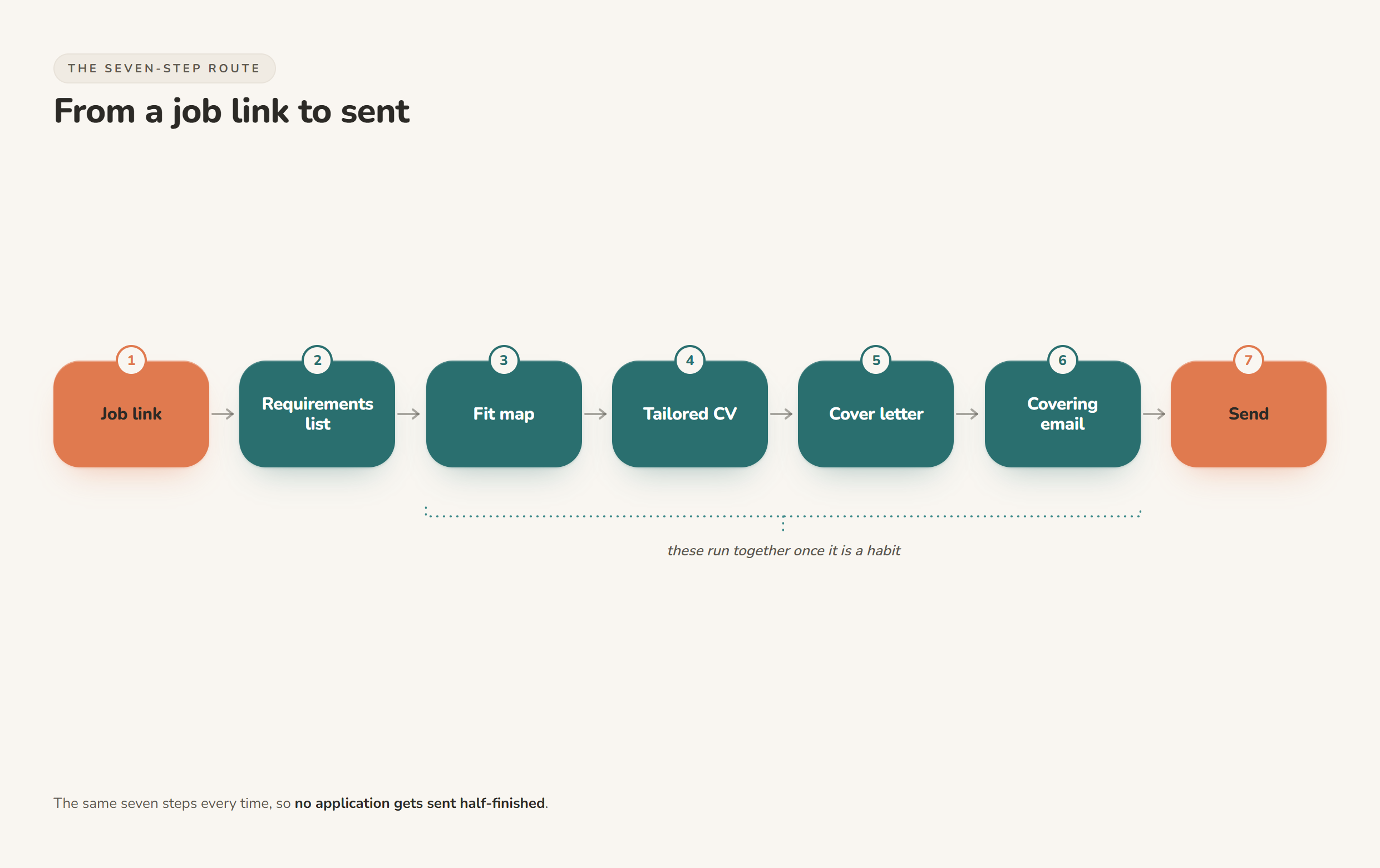
Both routes below end with a sent application. They differ in what the employer actually receives, and in how likely a person is to read past the first few seconds.
| Send the same CV everywhere | Tailor for the role | |
|---|---|---|
| Time per application | 2 to 5 minutes | 20 to 30 minutes |
| What the employer receives | One reused file | A CV, cover letter and email built for this ad |
| What the first screen shows | Whatever was already at the top | Points that answer this posting |
| Match to the ad's wording | Hit or miss | Their exact terms, where they are true for you |
| Cover letter | Skipped, or the same one each time | One specific reason you fit this role |
| Realistic result | Easy to skim past | More likely to be read by a person |
Step 1: turn the job link into a requirements list
Open the posting and read it twice. The first pass is for the role. The second is for the words. Note the responsibilities and the required skills, and copy the exact phrases the employer uses. If the ad says "stakeholder reporting", write down "stakeholder reporting", not "keeping people informed".
Look for the instructions buried in the text too. Some postings ask you to include a notice period, quote a reference number, answer a specific question, or send a particular file format. Following those is its own quiet test, and skipping one is an easy way to be filtered out before anyone reads a word about your experience.
Paste the text into a local document while you are there. Job links expire, and you want the requirements in front of you for the next four steps.
Step 2: match your real evidence to each requirement
Make two columns. On the left, every requirement from the ad. On the right, one thing you have actually done that matches it. Where you have no honest match, leave the line blank.
That blank is information, not a failure. It shows where to be modest in this application, and it points to what a short course or a side project could fix before the next one. The map also stops you inventing things. You are choosing which true parts of your history to feature, not writing new ones. If your applications keep going quiet and you are not sure why, the gaps in this column are usually the place to look. There is more on that in why my CV keeps getting rejected.
Step 3: tailor the CV so the first screen answers the ad
Reviewers do not read a CV top to bottom on the first pass. An eye-tracking study by Ladders found recruiters spend an average of 7.4 seconds on a resume before deciding to keep reading or move on (HR Dive). Tufts University's career team describes the same behaviour from the reviewer's side: they scan down the left of the page and read only the first few words of each bullet, so the important detail has to come first (Tufts Career Center).
So rewrite the top third to earn those seconds. Redo your summary and your most recent role so the opening lines answer the ad, put the strongest word of each bullet at the front, and use figures you can defend in an interview. "Cut report preparation from 3 days to 1" beats "improved efficiency", and you can back it up when asked. Keep the rest of your history accurate and complete underneath.
Two things go deeper than this step has room for. For the full tailoring method, run locally, see how to tailor a CV to a job description. For using the ad's terms without tripping into keyword stuffing, see how to customise a CV for ATS without keyword stuffing.
Step 4: write a cover letter that adds something new
A cover letter is not your CV in paragraphs. MIT's career office puts it plainly: do not simply repeat your resume, complement it with a little more detail about a key experience, and use a couple of examples that show you can do this specific job (MIT Career Advising).
Keep it short. Three or four short paragraphs is enough. Open with the one concrete reason you fit this role, give a single example that proves it, and say what you would bring in the first few months. Address a named person if the posting has one. If you find yourself writing sentences that would fit any job, cut them, because a reviewer can tell.
Step 5: write the covering email, the part people forget
The email that carries your attachments gets read before the attachments do. It deserves more than "Please find my CV attached".
- Subject line: the role title, the reference number if there is one, and your name. Easy to file, easy to find later.
- Body: two or three sentences. Who you are, the role you are applying for, and one line on why. The detail lives in the letter.
- Attachments: name the files as a person would search for them, like Firstname-Lastname-CV.pdf and Firstname-Lastname-Cover-Letter.pdf. Attach both, and check they are actually attached before you move on.
Step 6: run the pre-send check
This is a two-minute pass that catches the errors that sink otherwise good applications. Read it out loud once, then check:
- The company name is correct everywhere. A letter addressed to the wrong company is the fastest way to the no pile.
- The first screen of the CV answers this ad.
- Every claim is true and something you could defend in an interview.
- The exact phrases from the posting appear where they are honestly true for you.
- Numbers are specific and explainable.
- Any instruction from the posting, such as a reference number or notice period, is included.
- Both files are attached, named clearly, and export cleanly to PDF.
Step 7: send it, log it, then prepare for the interview
Send from your own email client so a copy stays in your Sent folder. Then write the application down somewhere you will look again: the role, the company, the date, the link, and which version of your CV you sent. When a reply arrives two weeks later, that one line saves you from staring at an email you do not remember.
While the posting is still open in front of you, draft a few likely interview questions from it. The requirements you mapped in step two are the questions a good interviewer will ask, so you have already done half the work. There is a full method in how to prepare interview questions from a job posting.
How to run the whole process in CVumi
CVumi is a desktop app for Windows and macOS that does these seven steps on your own machine. Your CV, your master profile and your past applications live in a folder you choose on your computer. CVumi runs no server that stores your documents, and when an AI step runs, the request goes straight from your machine to the AI provider under your own key, not through a server that keeps a copy.
You paste the job, or point it at one you found, and it reads the posting and your history locally. From there it writes a tailored CV, a matching cover letter and the covering email together, so you are not assembling three documents by hand. The fit analysis shows where you genuinely match the role and where the real gaps are, using only your actual experience, and it does not invent achievements to fill a blank. If one section is not quite right, you can highlight it and ask the assistant to refine that part alone, leaving the rest untouched. When it is ready, one click opens your normal email client with the CV and cover letter attached, so you review and send it yourself.
One honest point. CVumi tailors what is already true about you and gets it ready faster. It does not write a career from nothing, and it does not promise interviews or offers. The seven steps are still the work. The app just removes the assembly.
CVumi is a one-time payment: 69 EUR for the standard licence with three device activations, or 34 EUR with a student email, and no subscription. If you are weighing that against a monthly tool, see one-time payment vs subscription resume builders.
Ready to send, not rushed
Once the order is a habit, going from a saved job link to a ready-to-send application takes about 20 to 30 minutes, and every application actually fits the job you are applying for. That is slower than sending the same file to everyone, and it is the part that gets replies.
If you would rather have these steps handled on your own machine, download CVumi. One payment, your files stay local, and you send every application yourself.